Scholarship Guide
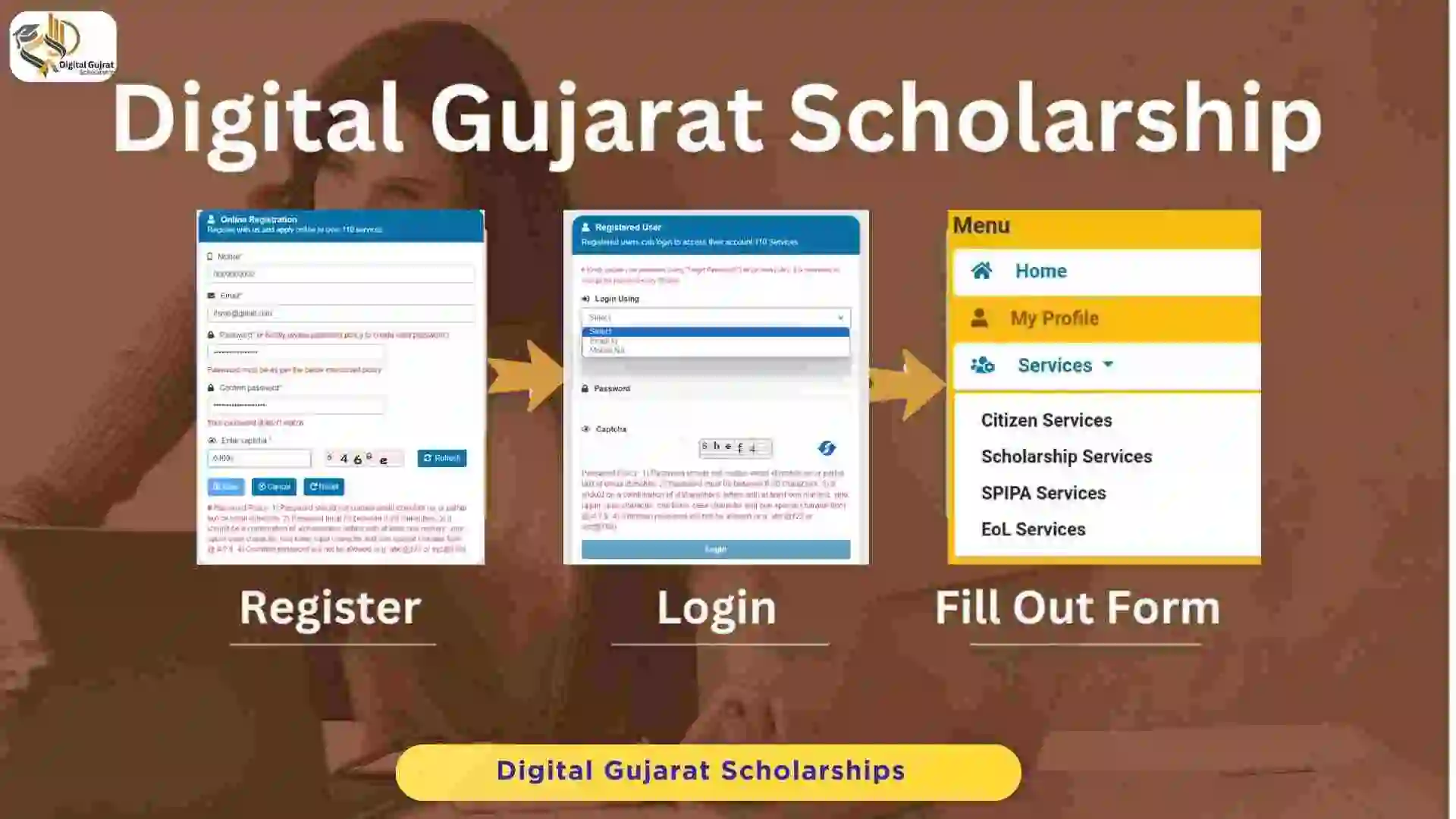
Digital Gujarat Scholarship Login, Registration & Form Submission
Welcome to the interactive guide for the Digital Gujarat Scholarship. This application will walk you through every stage of the process, from creating your account to final submission.
The Digital Gujarat Scholarship Login simplifies access to various scholarship services. This guide provides step-by-step instructions for registration, login, and the 5-step application form, including details on bank info, academic history, and document uploads.
Use the navigation menu on the left to move between steps. Each section provides a focused look at what you need to do to complete your application successfully.
1. Digital Gujarat Portal Registration
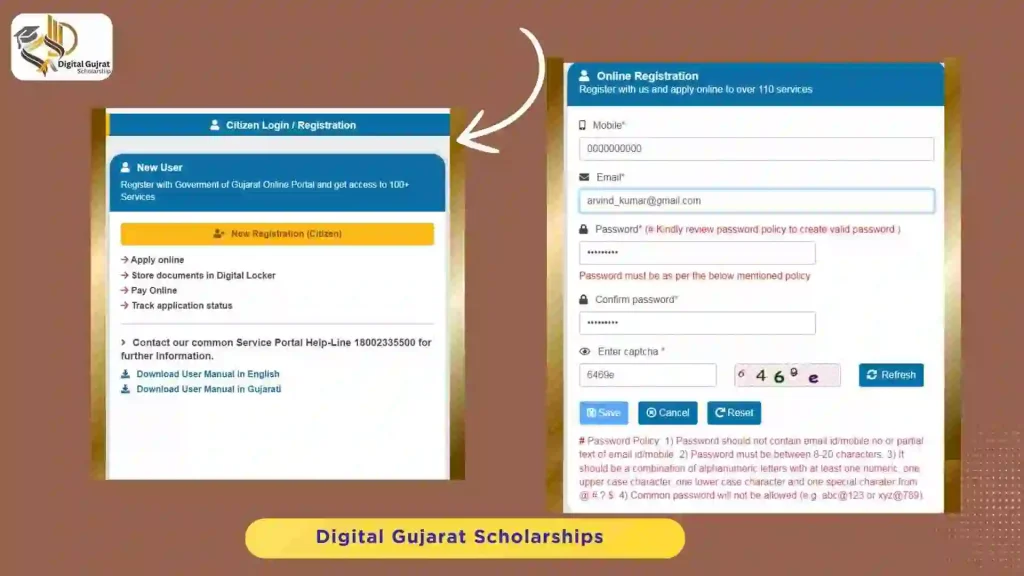
The registration process at the Digital Gujarat Portal is simple. You have to enter your mobile number, email address, password, and the captcha digits for the verification process.
If you don’t have a mobile number, you can put your family members’ numbers (father, mother, brother, sister or near relatives). Make sure that the mobile number is accessible, as a one-time password (OTP) will be sent to the entered number for verification.
The students who are already registered can skip this step and proceed with the Digital Gujarat Scholarship login.
2. Login & Find Service
Digital Gujarat Scholarship Login
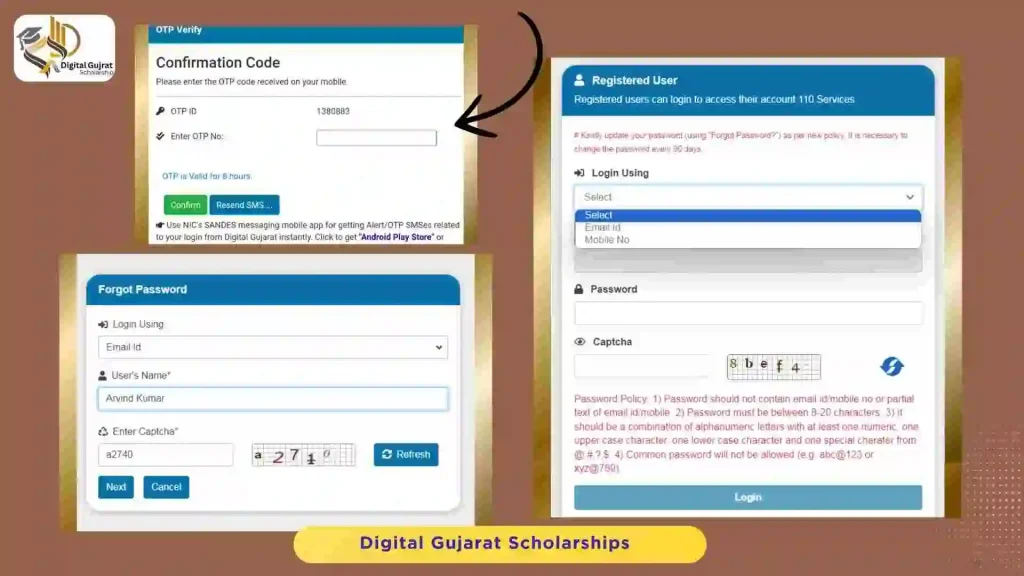
After registration, students can access the Digital Gujarat Scholarship Login portal by either their email or mobile number. An OTP will be sent to the email/mobile number, after confirmation, the student can proceed. In case of forgetting a password, press forgot password and follow the next steps.
Scholarship Service
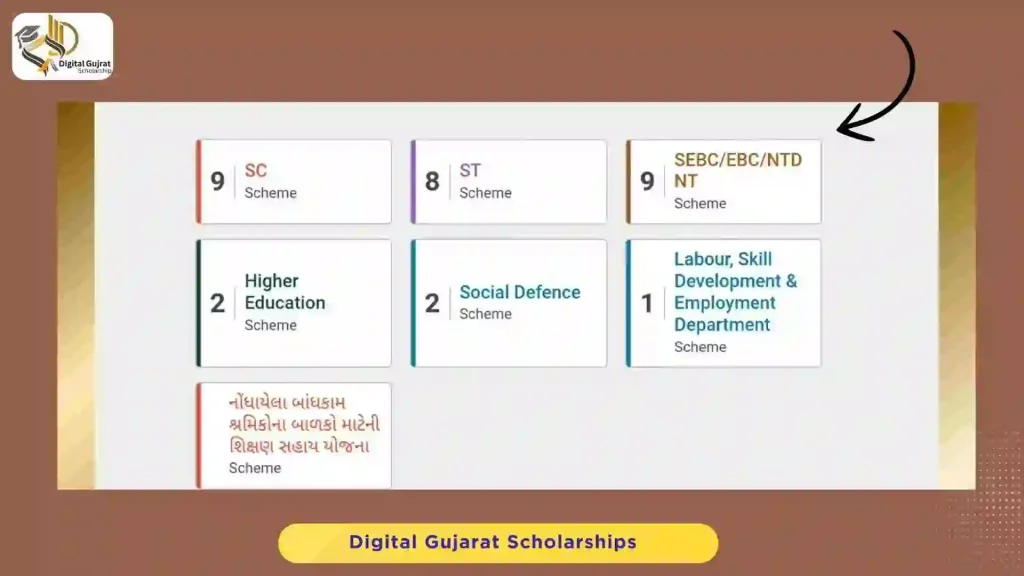
After the Digital Gujarat Scholarship login, navigate to the ‘Services’ tab and select ‘Scholarship Services’ from the drop-down menu. This will display all available scholarship options.
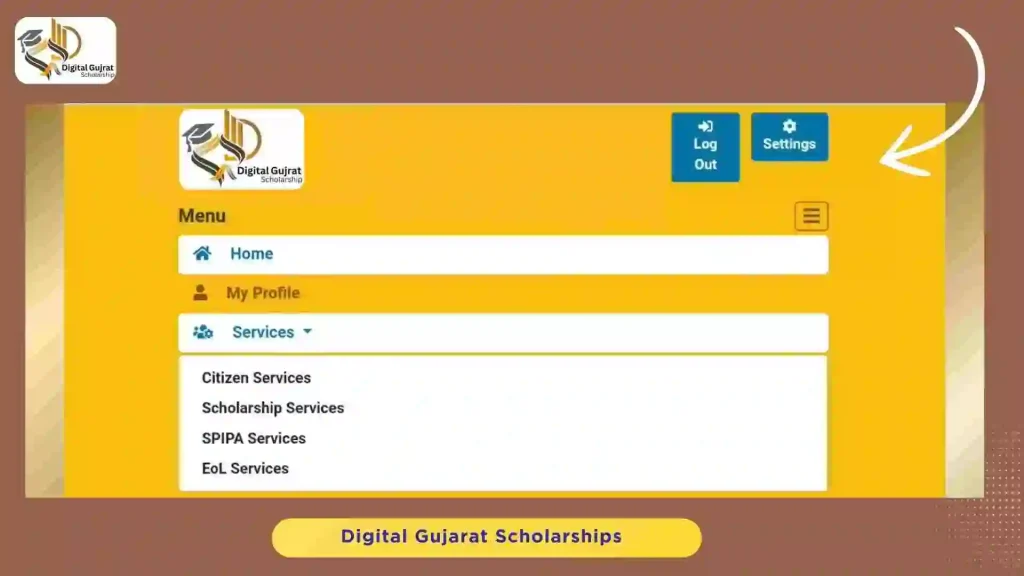
Select the scheme as per your category, such as SC, ST, SEBC/EBC/NTDNT, Higher Education, Social Defence, Labour, Skill Development & Employment Department, etc.
3. Application: Personal Details (Step 1)
This is the first step of the 5-step application form. After selecting your scholarship category, you must select the financial year.
The list of scholarships will be displayed. For example, under the SC category, you might see:
| No. | Digital Gujarat Scholarship SC Category |
|---|---|
| BCK-6.1 | Post-matric scholarship for SC students (Govt. of India) |
| BCK-6.1 | Post-matric scholarship for SC students (Govt. of India) Freeship Card Schemes |
| BCK-5 | Post-matric scholarship for SC girls |
| BCK-10 | Food bill assistance to SC students |
| BCK-11 | Fellowship scheme for M.Phil., Ph.D. for SC students |
| BCK-12 | Instrumental help to SC students (medical, engineering, diploma) |
After selecting your form, click “Continue Service.” You will need to fill in your registration details.
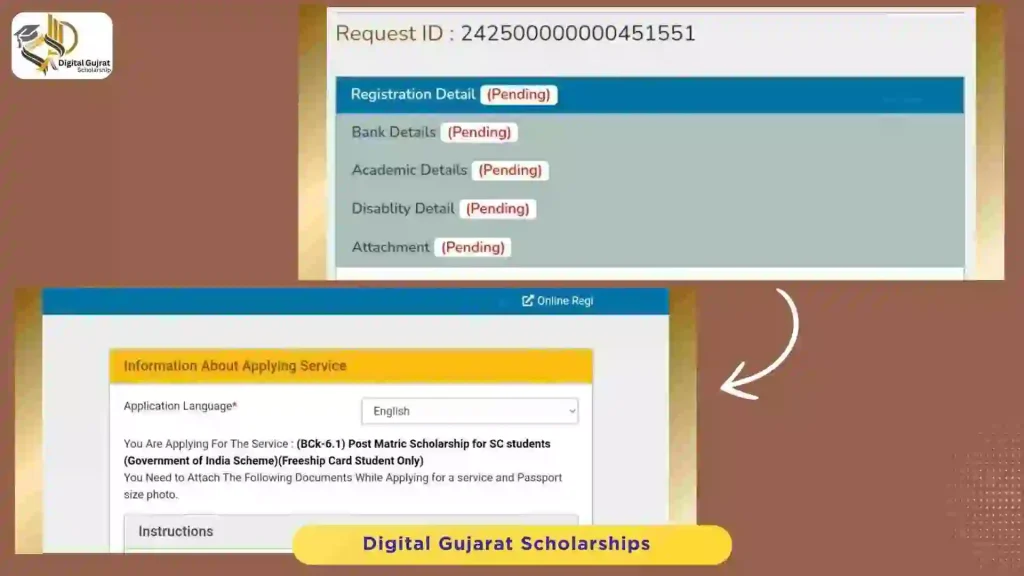
Personal Information
- First Name, Middle Name, Surname (As per mark sheet)
- Name (As per Aadhaar)
- Date of Birth & Gender
- Aadhaar Number (Click “Verify Aadhaar”)
- Ration Card Member Number (Click “Get Details”)
Do you know?
If you don’t enter the KYC information, you will not be able to fill the form. Download the My Ration app from the Play Store to complete KYC. It may take two days to update.
Other Details
- Mother’s name
- Community/Category & Caste
- Religion & Marital status
- Parent/Guardian occupation
- Annual family income (from all sources)
- Is orphan (yes/no)
- Day scholar/Hosteler & Hostel type
- Current and Permanent Address
Food Bill Assistance Form
If you are a hosteller, you can fill out the food bill/hostel assistance form from here to get benefits from that scheme.
Important Instructions
- All fields marked with “*” are mandatory.
- One application per student. Multiple applications will be rejected.
- Any misleading/wrong information will lead to rejection.
- Income certificates issued in the last 3 years are valid.
4. Application: Bank Details (Step 2)
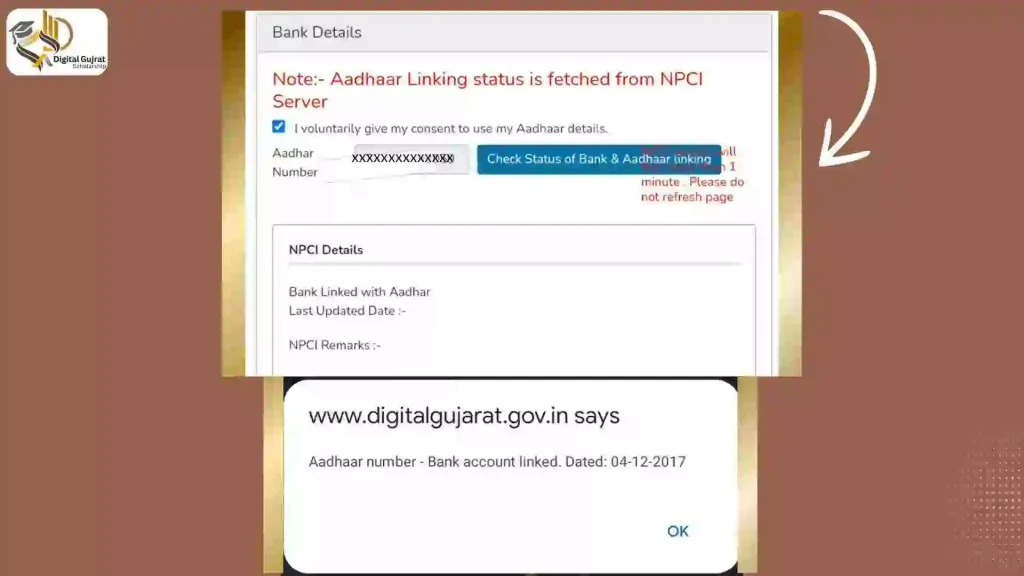
To receive your scholarship amount via Direct Benefit Transfer (DBT), you must link your bank account with your Aadhaar number.
Give your consent to use Aadhaar details by selecting the checkmark. Enter your Aadhaar number and select “Check the status of Bank & Aadhaar linking”. The status will be fetched from NPCI.
Next, enter your bank’s IFSC Code (e.g., SBIN0124152) and click “Show Bank Details.” The bank name and branch will auto-fill.
Finally, enter:
- Your bank account number
- Your name exactly as it appears on your bank passbook
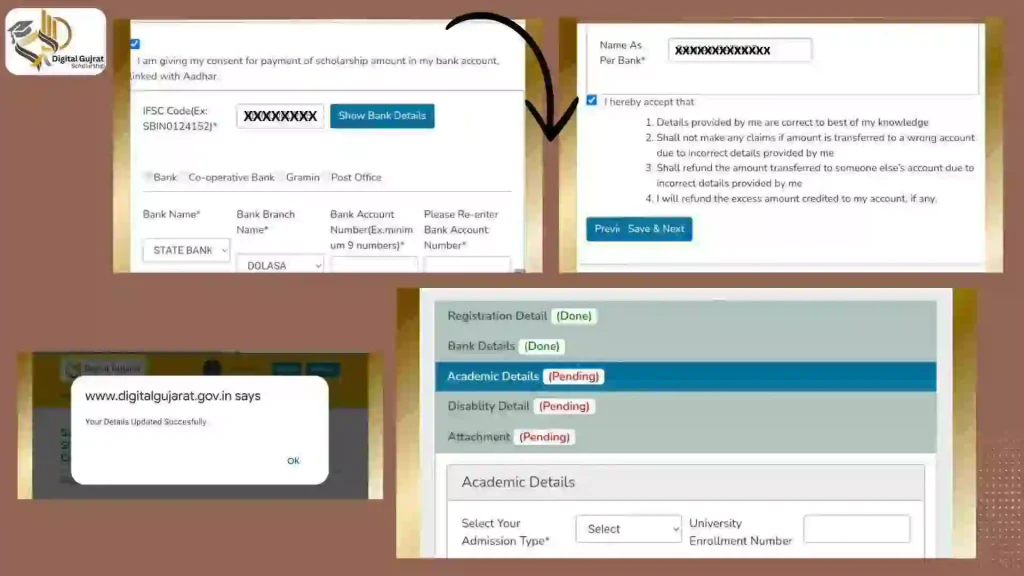
Click the “Save & Next” button to proceed.
5. Application: Academic Details (Step 3)
In this section, provide details about your current course and past education.
Present Course Details
- Admission Type: (e.g., Regular, Management Quota, Self-Finance)
- Course Type: (e.g., Medical, Para-medical, Engineering, Management)
- Course Name: (e.g., Bachelor of Vocational/B.Voc, PG Diploma)
- Current Year: (e.g., 1, 2, 3)
- Institution District & Name
- Course Start Date & Likely Completion Date
Where to find course dates?
If you don’t know the start and completion dates, contact your college/institution administration for this information.
Previous Education Details
Add your previous education details starting from the 10th standard (Course, Stream, Seat No., Passing Year, Percentage).
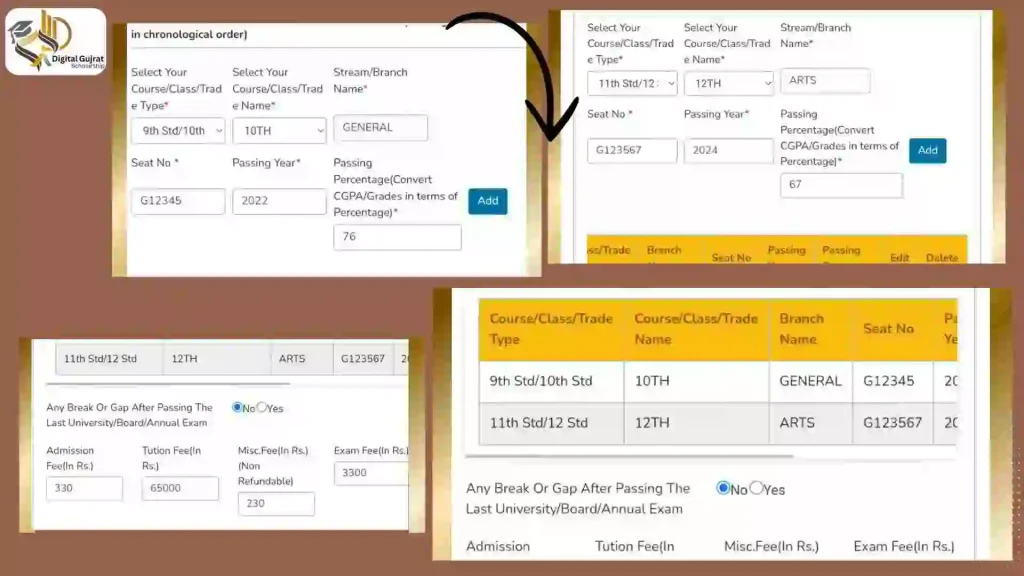
Freeship Card & Fee Details
You will also need to enter the fees for your current course (Admission Fee, Tuition Fee, Misc. Fee, Exam Fee). If you have a Freeship Card (for SC/ST categories), you must enter the Card Number, Issue Date, and Issuing District.
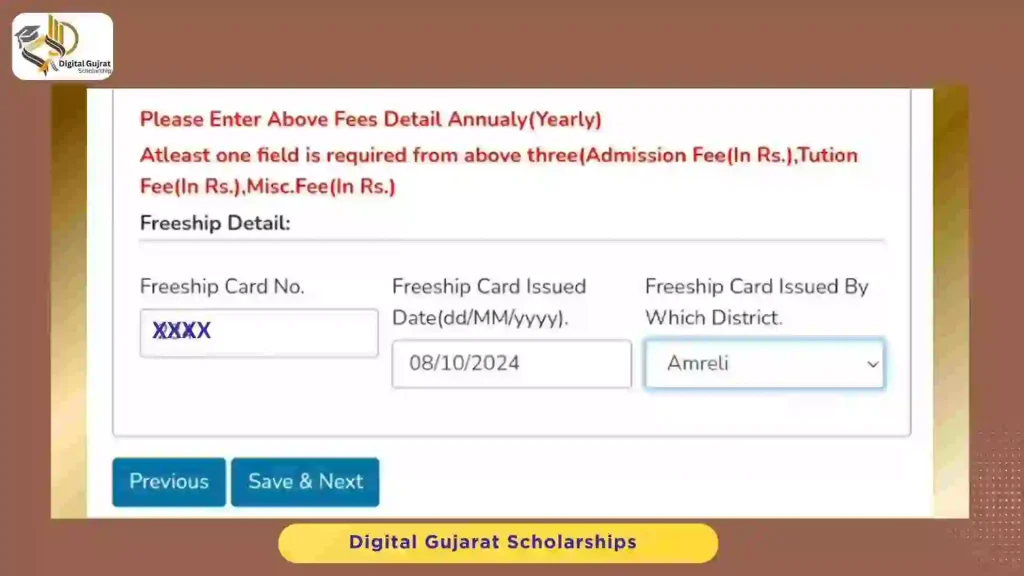
6. Application: Disability Details (Step 4)
If you have a disability, please fill in the following details. If not, select “No” and proceed.
- Any Disability (Yes/No)
- Area of Disability
- Percentage of Disability
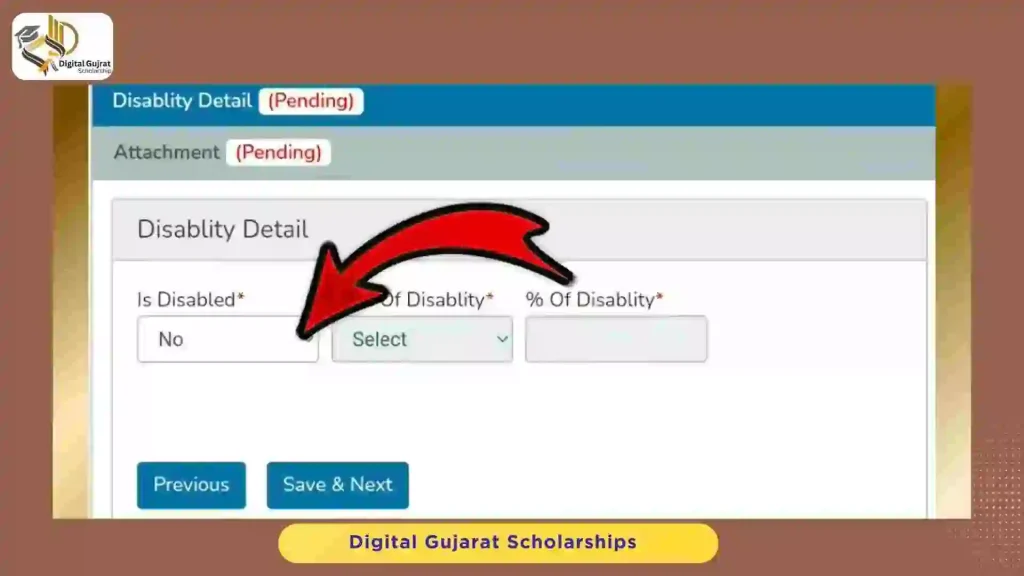
Click “Save & Next” to move to the final step of the form.
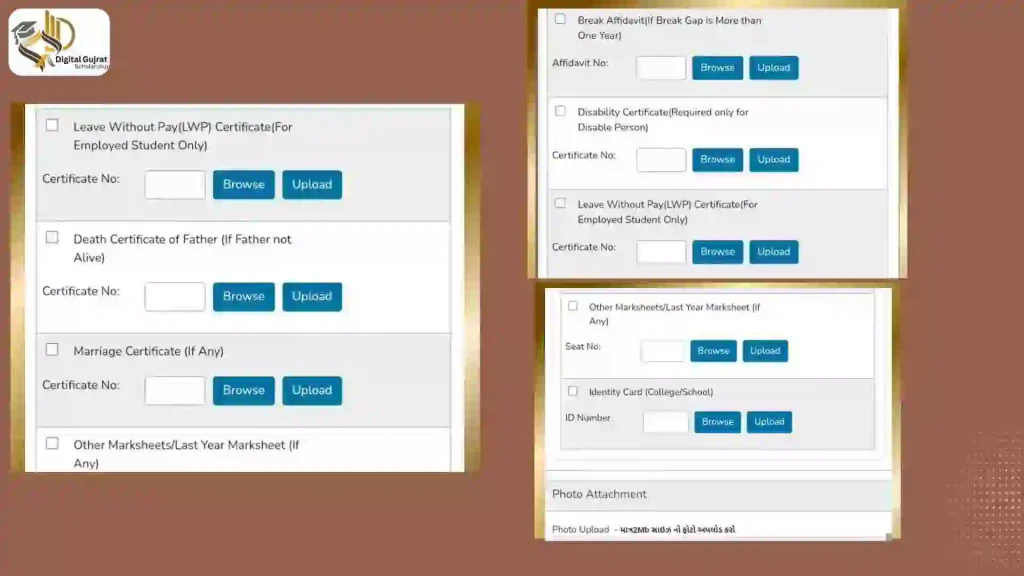
7. Application: Document Attachments (Step 5)
This is the final step for form filling. You must upload clear and readable copies of all required documents. The file size should not exceed 1MB (jpeg, jpg, pdf). Your photo should not exceed 2MB.
Required Documents Checklist:
- 📄 Caste Certificate
- 📄 Income Certificate
- 🏦 First page of Bank Passbook / Cancelled Cheque
- 💳 Freeship Card (If applicable)
- 🎓 Standard 10 Marksheet
- 🎓 Standard 12 Marksheet (If applicable)
- 🎓 Graduate Marksheet (If applicable)
- 🧾 Fee Receipt of Current Course
- 🏠 Hostel Certificate (If applicable)
- ✍️ Break Affidavit (If applicable)
- ♿ Disability Certificate (If applicable)
- 🆔 College/School Identity Card
- 🖼️ Passport Size Photo
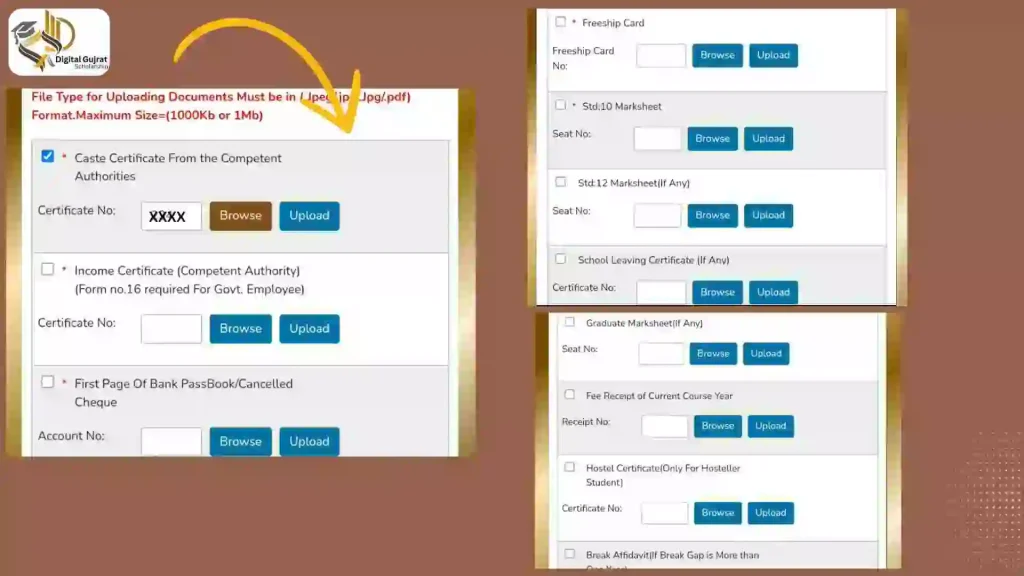
For each document, you must enter relevant details (like Certificate No., Date, etc.). Use the “Browse” button to find the file and “Upload” to attach it.
8. How to Submit the Application Online
After uploading all documents, follow these final steps:
- Select the checkmark to accept the terms and conditions, confirming all information is correct.
- Click “Save as draft”.
- Click the “Print” button to download your application.
- Take the printed application to your college/institute for verification by the administration.
After verification, log back into the Digital Gujarat portal. If your verifier requested changes, make them now. Once everything is correct, select the “Verify mobile number” button. An OTP will be sent to your phone. Enter this code to finally submit your application.
Note: Final Submission is Final
The application cannot be edited once submitted, so ensure all information is 100% correct before this final step.
Frequently Asked Questions
How to apply for a Digital Gujarat scholarship?
After registering and logging in, there are five steps to apply:
- Registration Details
- Bank Details
- Academic Details
- Disability Details
- Attachment (Documents uploading)
How to register Digital Gujarat Portal?
The registration process is simple. You have to enter your mobile number, email address, password, and the captcha digits for the verification process.
How to do KYC of Aadhaar Card Ration Card?
Download the My Ration app from the Play Store. It takes two days to complete KYC after initiating the process through the app.